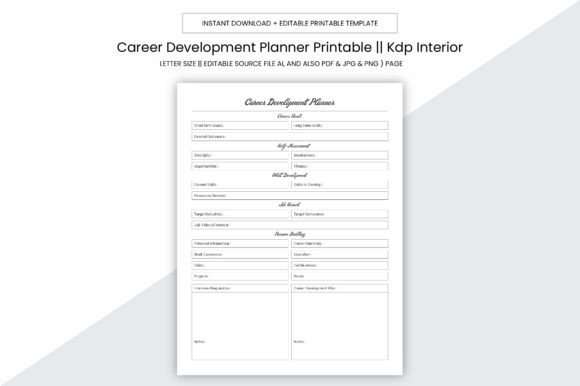
Career Development Planner Kdp Interior
A Career Development Planner Kdp Interior isn’t just another printable template—it’s a purpose-built, production-ready asset designed for creators who build and sell planner-based tools on Amazon Kindle Direct Publishing (KDP). It bridges the gap between thoughtful career planning and scalable digital product creation. Whether you’re launching your first KDP planner or expanding an established catalog, this interior delivers structure, flexibility, and professional-grade output—without requiring design expertise or expensive software subscriptions.
Where It Fits in Your Planning & Publishing Workflow
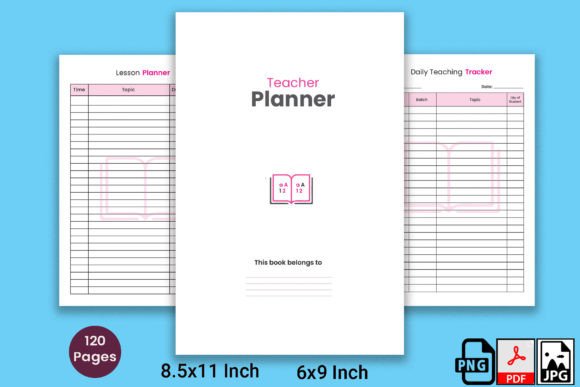
This interior serves two distinct but overlapping roles: as a functional tool for personal or client-facing career development work, and as a production foundation for commercial planners. Before uploading to KDP, it acts as your editable source file—ready to customize with branding, prompts, or niche-specific content. During the publishing phase, its 109-page PDF is formatted precisely to KDP’s print requirements: no bleed, 8.5 x 11 inch trim size, and 300 PPI resolution for crisp text and clean lines. After launch, it becomes the backbone of a reliable, repeatable product—consistent in quality, easy to update, and compatible with both print-on-demand and digital delivery models.
Practical Use Across Real-World Scenarios
Professionals use the Career Development Planner Kdp Interior to map skill gaps before enrolling in certification programs—or to document progress during a six-month upskilling sprint. Freelancers integrate it into onboarding workflows, sharing customized versions with clients to align on long-term growth goals. Educators adapt pages for student advising sessions, printing targeted sections to support career exploration units. Small business owners embed it into internal talent development cycles, pairing planner entries with quarterly review meetings.
For creators, the value shifts toward scalability. Because the package includes editable AI (Adobe Illustrator), PDF, JPG, PNG, and PPTX files, you can adjust layouts for different audiences—swap out industry-specific reflection questions for tech workers, add bilingual headers for global markets, or reformat a section into a slide deck for workshop facilitation. That modularity means one core interior supports multiple products: a general career planner, a midlife transition edition, or a new-grad launch kit—all without rebuilding from scratch.
Integration With Tools You Already Use
The Career Development Planner Kdp Interior works alongside common productivity systems—not against them. If you rely on Notion for task tracking, export weekly planner summaries as PDFs and attach them to relevant project pages. When using Trello or Asana, link planner milestones (e.g., “Complete LinkedIn profile refresh”) directly to cards with due dates. For those managing learning via Coursera or LinkedIn Learning, use the planner’s “Course Tracker” and “Skill Application Log” pages to record completion dates and real-world implementation examples—then reference those notes when updating resumes or preparing for interviews.
It also complements journaling practices. Unlike stream-of-consciousness notebooks, this interior structures reflection: dedicated space for identifying transferable skills, documenting feedback conversations, and auditing time spent across roles or projects. That consistency makes patterns visible over time—like recurring themes in performance reviews or seasonal dips in networking activity—so adjustments are data-informed, not reactive.
Preparation & Compatibility: What You Need to Get Started
No specialized hardware or subscriptions are required. The 8.5 x 11 inch size fits standard home printers and most local print shops—making test prints fast and affordable. Because there’s no bleed, margins stay predictable, reducing trimming errors during KDP proofing. The 300 PPI resolution ensures sharp text and legible checkboxes, even at small font sizes—a critical detail when readers fill in dense sections like “Competency Self-Assessment” or “Salary Negotiation Prep.”
All included file types serve specific purposes: the AI file lets designers tweak vector elements; PDF preserves layout integrity across devices; JPG and PNG allow quick mockup insertion into sales pages or social posts; PPTX supports live workshops or team training. This layered compatibility means you don’t need to choose between editing flexibility and final-output reliability—you get both.
Workflow Examples You Can Adapt Today
- For solopreneurs launching their first KDP planner: Start by replacing placeholder text in the AI file with your voice and brand colors. Export a test PDF, upload it to KDP’s previewer, and verify page numbers, header alignment, and gutter spacing. Then create a simple sales page highlighting three high-value sections—e.g., “Career Pivot Timeline,” “Interview Question Bank,” and “Salary Benchmarking Worksheet.”
- For educators building curriculum-aligned resources: Extract the “Goal Breakdown Grid” and “Milestone Reflection Prompts” as standalone handouts. Embed them into LMS modules alongside video lectures on growth mindset or portfolio development. Later, compile completed student pages into a class-wide “Career Pathways Map” for peer learning.
- For HR teams supporting internal mobility: Print the “Role Transition Checklist” and “Stakeholder Communication Planner” for managers guiding employees through lateral moves. Pair each printed copy with a 15-minute coaching session focused on translating past achievements into future-ready language.
Long-Term Usability & Quality Control
Sustained usefulness depends on clarity—not complexity. Every page in the Career Development Planner Kdp Interior follows consistent visual hierarchy: clear headings, ample white space, intuitive icons, and logical progression from assessment to action. There are no decorative flourishes that distract from function. That intentional minimalism helps users return month after month without cognitive fatigue.
Quality control starts before upload. Because the package includes both editable and final-form files, you can spot-check key pages—cover, table of contents, index, and final reflection section—for typos, misaligned headers, or inconsistent fonts. Run the PDF through KDP’s automated preflight checker, then order a physical proof. Compare it side-by-side with your screen version: check margin balance, color fidelity, and paper weight suitability. That verification step prevents costly reprints or negative reviews tied to formatting issues.
Building Consistency Into Your Routine
Integrating the Career Development Planner Kdp Interior smoothly doesn’t require daily logging. Instead, anchor usage to existing rhythms: review the “Quarterly Career Pulse Check” every three months alongside tax prep or budget planning; update the “Network Growth Tracker” during your weekly email cleanup; revisit the “Values Alignment Audit” whenever considering a new contract, role, or collaboration.
For teams, assign one person to maintain a shared digital version (using the PDF in a cloud folder with comment permissions enabled) while keeping printed copies available for in-person strategy sessions. That hybrid approach preserves accessibility while encouraging active engagement—not passive storage.
Final Thought: A Tool That Scales With Your Intent
The Career Development Planner Kdp Interior succeeds because it respects process over polish. It assumes you’re balancing real constraints—time, bandwidth, budget—and gives you room to adapt without sacrificing professionalism. Whether you’re guiding a client toward their next promotion, refining your own career narrative, or building a KDP business rooted in practical value, this interior provides scaffolding—not scripts. It doesn’t tell you what to think. It gives you space, structure, and reliability to figure it out—on your terms, in your timeline, and with measurable results.