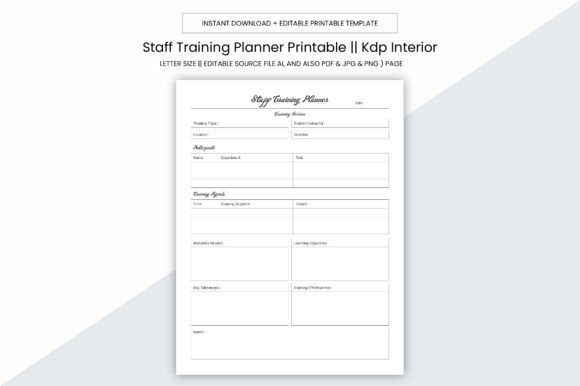
Staff Training Planner KDP Interior
If you're creating training resources for teams, launching a coaching business, or publishing professional workbooks on Amazon KDP, the Staff Training Planner KDP Interior is designed to simplify your workflow — without sacrificing polish or practicality. It’s not just another printable planner. It’s a fully pre-formatted, production-ready interior file built specifically for creators who want to go from idea to published book — fast and confidently.
What Exactly Is This Interior?
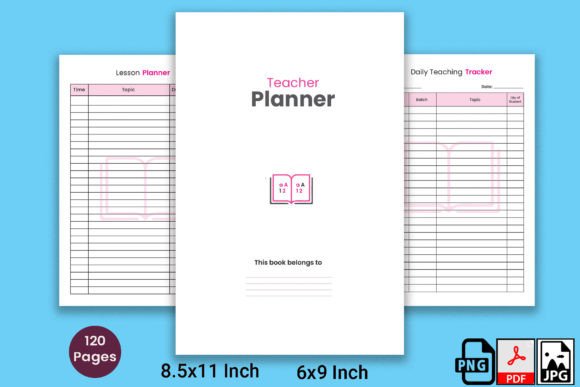
Think of it as the “inside” of your training planner — the 109-page core that goes between the cover and back matter when you upload to Kindle Direct Publishing. Unlike generic notebooks or blank templates, this interior is purpose-built: clean layouts, consistent spacing, logical section flow, and optimized margins for KDP’s printing standards. Every page supports real-world staff development — from onboarding checklists and competency trackers to session notes, feedback forms, and progress summaries.
Why It Fits Real Needs (Not Just Theory)
Small business owners often juggle hiring, training, and compliance — all while managing day-to-day operations. A disorganized training process leads to inconsistent onboarding, forgotten follow-ups, and missed documentation. This interior solves that by offering structure *without* rigidity. You’re not locked into someone else’s system — you get editable source files (Adobe Illustrator .ai), plus versatile PDF, JPG, PNG, and even PPTX versions. That means you can tweak headers, adjust fonts for brand alignment, or repurpose individual pages for team handouts or digital slides.
Designed for Flexibility — Not Just Printing
The 8.5 x 11 inch size isn’t arbitrary. It’s standard for U.S. printers, local print shops, and home office setups — so whether you’re binding physical copies for in-person workshops or uploading directly to KDP, the layout stays true. And because there’s no bleed, you won’t lose critical content near the edges during trimming. The 300 ppi resolution ensures crisp text and clear lines — essential when trainees are scanning QR codes, filling out checkboxes, or referencing visual timelines.
Where You’ll Actually Use It
- For solopreneurs and coaches: Package this interior as part of a premium training bundle — add your logo, customize the cover, and sell it as a downloadable workbook or printed companion to your courses.
- In small retail or service businesses: Print copies for new hires, then use the editable AI file to insert your company’s safety protocols, SOPs, or customer service scripts right into the planner.
- For educators and HR professionals: Repurpose the session log pages as observation tools during mentoring programs — or convert the competency tracker into a digital form using the PDF version with fillable fields.
- For KDP publishers: Upload the ready-to-go 109-page PDF directly — no formatting surprises, no rejected files. It’s already aligned with KDP’s trim size, margin, and font guidelines.
Beginner-Friendly, But Built for Growth
You don’t need design experience to use this. If you’ve ever opened a PDF and typed into a form field, you can personalize it. The included PDF is fully editable in Adobe Acrobat (or free alternatives like Preview on Mac). Prefer deeper control? Open the Illustrator file to change colors, reposition sections, or integrate your brand’s typography. Even the JPG and PNG versions let you drop pages into Canva or PowerPoint for quick presentations or social media snippets.
Practical Things to Keep in Mind
Before diving in, consider how you’ll use the planner long-term. If you plan to offer updates — like adding new modules or seasonal refresher content — save your customizations in layers within the AI file. That way, future edits stay organized. Also, remember that while the interior is print-optimized, final output depends on your printer’s calibration. Always run a test print on plain paper first — especially if you’re using colored accents or fine-line graphics.
Another smart step: pair this interior with a matching cover template. KDP requires separate front/back/middle files — and since this interior includes no cover art or copyright page, you’ll want to build those separately (or use a complementary cover design). Also note — this is a digital download only. No physical product ships. You’ll receive instant access to all file types after purchase.
Real Value Beyond the Pages
At its core, the Staff Training Planner KDP Interior saves time — but more importantly, it adds consistency. When every trainer uses the same structure for evaluations, feedback, and goal-setting, it becomes easier to spot trends, improve programs, and demonstrate accountability. For freelancers building credibility, having a polished, professional-looking planner signals expertise. For educators, it transforms abstract learning objectives into tangible, trackable actions.
And because it works across contexts — personal development, commercial training, or KDP publishing — you’re not buying a one-off tool. You’re investing in a reusable framework. Change the title, swap out examples, update dates year after year. The interior stays relevant, even as your needs evolve.
Final Thought: Clarity Starts With Structure
A great training experience doesn’t happen by accident. It starts with thoughtful planning — and that starts with having the right tools in place. This interior removes the guesswork from formatting, lets you focus on what matters most (your content and your people), and gives you the flexibility to adapt as your team grows. Whether you’re documenting your first hire or scaling a nationwide training program, it’s designed to grow with you — cleanly, consistently, and without unnecessary complexity.