Switch Off Journal Canva KDP Interior: A Flexible, Print-Ready Digital Detox Resource
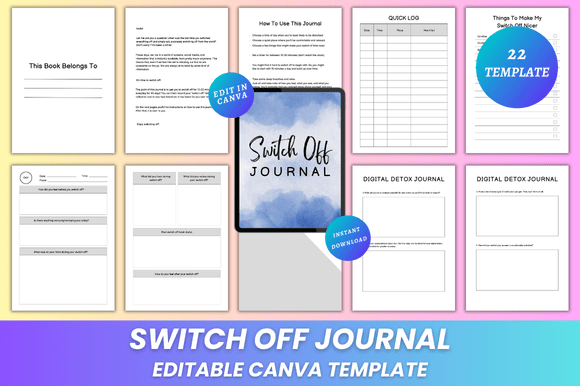
The Switch Off Journal Canva KDP Interior is a thoughtfully structured, 22-page printable journal designed to support intentional digital detoxing. Unlike static PDF journals or generic planners, this interior stands out for its dual nature: it’s both a ready-to-use, print-optimized layout and a fully editable Canva template. That means you’re not locked into fixed fonts, colors, or spacing—you can adapt every visual and structural element to match your brand, aesthetic, or functional needs before exporting.
What Makes This Interior Distinct From Other Digital Detox Journals?
Most digital detox journals fall into one of two categories: pre-designed, non-editable PDFs (ideal for immediate printing but inflexible), or blank Canva templates with minimal structure (offering freedom but little guidance). The Switch Off Journal Canva KDP Interior bridges that gap. It includes purpose-built sections—like “Quick Log,” “Preventing a Relapse,” and “During Digital Detox”—each grounded in behavioral psychology principles around habit interruption and mindful technology use. Yet none of those pages are rigid: fonts, color palettes, margins, and even layout grids adjust seamlessly in Canva.
This balance supports two common user goals: creators building a KDP product who need consistency and professionalism, and individuals seeking personalization without design expertise. For example, a wellness coach launching a branded journal series can change the header font to match their website, insert their logo on the “Thank You” page, and adjust the background tone across all 22 pages in under ten minutes—without touching code or desktop software.
How It Compares With Alternative Formats
Compared to standard KDP interiors built in Microsoft Word or Adobe InDesign, the Switch Off Journal Canva KDP Interior offers faster iteration and broader accessibility. Canva’s interface lowers the barrier for non-designers, while still delivering print-ready output. However, users needing advanced typography controls (e.g., precise kerning or OpenType features) or complex multi-column layouts may find Canva’s limitations noticeable—though for an A4, no-bleed, minimalist journal, those constraints rarely impact usability.
When weighed against free or low-cost digital detox worksheets found online, this interior provides significantly more scaffolding. Free resources often consist of single-page checklists or vague prompts. Here, the six dedicated “Digital Detox Journal” pages guide reflection across different timeframes—immediate actions, mid-detox observations, and post-detox integration—while “Benefits of This Detox” spans two pages to encourage deeper self-assessment over time.
Key Features—and What They Mean in Practice
The included features reflect deliberate decisions about utility and production readiness:
- Editable Canva Link: Not just a download—you receive a live, shareable Canva link with full editing permissions. No need to recreate layers or reformat text boxes.
- High-Quality Print-Ready PDFs: Exported at 300 DPI, CMYK-ready (where applicable), with proper A4 dimensions (8.3 × 11.7 inches) and no bleed—meeting KDP’s technical requirements out of the box.
- JPG and PNG Files: Useful for mockups, social media previews, or embedding into sales pages without revealing editable content.
- Clean, Minimal Design: Ample white space, consistent hierarchy, and restrained typography reduce cognitive load—critical when supporting behavior change, not aesthetic distraction.
- 22 Pages With Functional Groupings: Includes a “Belongs To” page (for gifting or branding), “Things To Make My Switch Off Nicer” (a gentle nudge toward environmental and ritual-based support), and dual “My Notes” pages—giving space for unstructured reflection without overcrowding the core detox framework.
Realistic Use Cases and Fit
This interior works well when your priority is speed-to-market paired with meaningful customization. Consider it if:
- You’re launching a small batch of digital detox journals on KDP and want to test messaging, cover design, or pricing without investing in custom design work.
- You’re a therapist, life coach, or educator creating client-facing tools and need to align visuals with your existing brand guidelines—without hiring a designer each time.
- You prefer working visually and want to experiment with layout variations (e.g., switching from lined to dot-grid pages, adjusting prompt placement) before finalizing a version for print.
It’s less suited for users requiring strict accessibility compliance (e.g., screen-reader–friendly tagged PDFs), ultra-niche formatting (like spiral-bound layouts with custom perforations), or integration with external apps (e.g., syncing journal entries to Notion or Obsidian). Those needs typically demand bespoke development or specialized publishing tools.
Practical Tradeoffs to Acknowledge
While the flexibility of Canva is a strength, it comes with tradeoffs. Because edits happen online, users must maintain an active Canva account—and ensure their chosen plan supports necessary features (e.g., brand kits for consistent color/font reuse). Also, while the interior is optimized for A4, minor adjustments may be needed for US Letter sizing, depending on printer calibration or binding method.
Another consideration: the minimalist aesthetic prioritizes clarity over decoration. If your audience responds strongly to illustrated elements, textured backgrounds, or hand-lettered accents, you’ll need to add those manually in Canva—which is possible, but adds time. The template doesn’t include decorative assets; it provides structure, not embellishment.
When to Choose This Over Other Options
Choose the Switch Off Journal Canva KDP Interior when you value control without complexity—when you want to iterate quickly, maintain visual coherence across products, and avoid vendor lock-in. It’s especially practical for creators who already use Canva for marketing assets and want to extend that workflow into product development.
Alternatively, if you’re building a long-term journal series with evolving themes (e.g., seasonal detox editions, targeted versions for teens or remote workers), investing in reusable InDesign templates or collaborating with a designer may offer greater scalability down the line—even if the upfront cost and learning curve are higher.
Final Thoughts for Evaluators and Decision-Makers
There’s no universal “best” journal interior—only what fits your goals, timeline, technical comfort, and audience expectations. The Switch Off Journal Canva KDP Interior excels as a pragmatic middle ground: structured enough to guide meaningful reflection, flexible enough to reflect individual voice, and production-ready enough to move from idea to printed book in hours—not weeks. Its inclusion of both editable and static file types (PDF, JPG, PNG) also simplifies distribution: use the PDF for print, the PNG for thumbnails, and the Canva link for ongoing refinement.
As with any resource tied to behavior change, its effectiveness ultimately depends less on design perfection and more on how consistently it supports real-world use. A beautifully formatted journal that sits unused delivers less value than a slightly imperfect one that gets opened daily. The Switch Off Journal Canva KDP Interior leans into that reality—offering substance, simplicity, and the quiet confidence that comes from knowing you can adapt it, not just accept it.