Vlog Planner Kdp Interior
If you’re building a vlog-based business—or scaling one—you know how much time gets lost in disorganized planning. A scattered content calendar, mismatched thumbnails, inconsistent branding across platforms, and last-minute script edits drain energy that should go into creating. The Vlog Planner Kdp Interior solves that—not as another generic notebook, but as a purpose-built, production-ready interior designed specifically for creators who ship consistently and professionally.
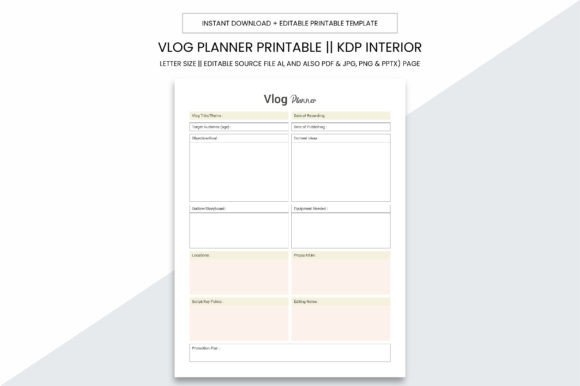
This isn’t just a PDF with lines and boxes. It’s a 109-page, print-optimized interior built from the ground up for real-world vlog workflows: episode ideation, shot lists, thumbnail sketch zones, audio checklists, publishing timelines, analytics tracking, sponsor briefs, and even post-upload reflection prompts. Visually, it balances clean structure with subtle personality—think soft rounded corners on section headers, intentional whitespace around checkboxes, and a consistent grid system that guides the eye without feeling rigid. It avoids visual noise but never feels sterile. That balance is why it works equally well for a solo creator filming in their living room and a small studio managing three YouTube channels.
Designed for Print—Not Just Pixels
The Vlog Planner Kdp Interior ships at 8.5 x 11 inches with no bleed—a deliberate choice. That means what you see on screen matches exactly what prints. No guesswork, no cropping surprises when uploading to Kindle Direct Publishing (KDP). Every page is set at 300 PPI, optimized for crisp text, sharp icons, and legible handwritten notes—even when printed on standard office paper or matte book stock. You’ll notice the difference immediately: headings stay bold and clear, light gray guide lines don’t fade or smudge, and checkbox borders remain distinct after multiple erasures.
Because it’s built for KDP, margins follow Amazon’s current interior guidelines—no manual trimming or reformatting needed. But it’s also flexible enough for local print shops or home printers. Want to bind it as a spiral-bound companion for your editing desk? Done. Need to extract just the “Thumbnail Brainstorm” spread for a team workshop? Easy—the layered AI source file makes that possible.
Editable Files Mean Real Control
You get more than a static PDF. The package includes editable source files in Adobe Illustrator (.ai), plus high-res PDF, JPG, PNG, and even PPTX versions. That matters because flexibility changes how you use it. The .ai file lets designers tweak colors to match a brand palette, adjust spacing for bilingual notes, or swap out icons for custom ones. The PPTX version? Perfect for turning planner pages into slide-based client briefs or internal training decks. And the PNGs work cleanly in Canva or Notion if you want to digitize parts of the workflow without losing fidelity.
This isn’t about over-engineering—it’s about respecting how people actually work. Some days you’ll handwrite in a coffee shop. Other days you’ll type directly into the PDF using Acrobat or GoodNotes. Still others, you’ll drop a PNG into a Trello card or embed a planner section into a Loom walkthrough. The Vlog Planner Kdp Interior supports all of it, without forcing one method.
Where This Interior Fits—and Where It Doesn’t
This interior shines in projects where clarity, consistency, and creator intent are non-negotiable. Think: self-published vlog workbooks sold on Etsy or Gumroad; branded planning kits for coaching clients; printable bundles for email list growth; or even as the foundation for a physical planner line via print-on-demand. Its structure supports both personal discipline and commercial scalability—because the same page that helps you plan your next “How I Edit Audio” tutorial also works as a white-labeled tool for your video-editing course students.
It’s less ideal for highly illustrated journals or story-driven planners where narrative flow matters more than functional layout. There’s no watercolor texture, no illustrated characters, no decorative flourishes—by design. If your audience expects whimsy or maximalist visuals, this interior won’t match that tone. But if they value efficiency, repeatability, and quiet professionalism? It becomes invisible scaffolding—supporting their process without competing for attention.
Testing Fit Before You Commit
Before adding this to your product lineup—or using it for your own channel—ask two questions: First, does the rhythm of the layout match how you actually plan? Flip through the sample pages. Try filling out a single “Episode Prep” spread with real ideas. Does the sequence feel intuitive? Do the prompts spark action—or just add friction? Second, test readability at actual size. Print one page at 100% on your default printer. Hold it at arm’s length. Scan it quickly. Can you spot the date field, the main objective, and the “Next Step” box in under three seconds? If yes, the visual hierarchy is working.
Also check font pairings if you plan to customize. The interior uses a clean, neutral sans serif (not included, but specified in the style guide) that pairs reliably with most display fonts—whether you’re layering a bold geometric headline or a friendly handwritten subhead for social media graphics. Avoid pairing it with overly ornate serifs or tight condensed fonts; those clash with its open, functional ethos.
Ready When You Are—No Setup Required
There’s no learning curve here. You download, open, and go. Whether you’re uploading straight to KDP, prepping files for a local printer, or dropping assets into a Canva template, everything aligns. The PDF is fully bookmarked by section, tagged for accessibility, and flattened for reliable rendering across devices. The AI file retains layers and named objects—so if you need to change the color of all “Status” badges or update copyright text globally, it takes minutes, not hours.
For entrepreneurs, this means faster time-to-market. For creators, it means less admin overhead and more time in front of the camera or in the edit suite. And for designers building client-facing tools? It’s a solid, ethical foundation—licensed for unlimited commercial use, no attribution required, no hidden limits on copies or revenue.
The Vlog Planner Kdp Interior doesn’t try to be everything. It focuses on doing one thing exceptionally well: helping vloggers and video-first businesses plan with intention, ship with confidence, and scale without chaos. That focus is its strength—and why it stays open on desks, inside binders, and embedded in workflows long after the novelty wears off.