Wide Ruled Notebook KDP Interior: Your All-in-One Printable Design Solution for Amazon Publishing
If you're creating notebooks, journals, or diaries for Amazon KDP—and especially if you're targeting students, educators, or note-takers who prefer generous line spacing—you’ve likely searched for a reliable, print-ready Wide Ruled Notebook KDP Interior. What sets this particular resource apart isn’t just its clean layout—it’s the thoughtful, production-ready packaging behind it. This isn’t a generic template slapped together in Canva. It’s a tested, versatile, and technically precise interior file built for real-world publishing success.
Why Wide Ruling Still Matters—Especially on KDP
Wide ruled (also called college-ruled or legal-ruled, depending on region) offers 11⁄32-inch (≈8.7 mm) spacing between lines. That extra breathing room makes a tangible difference: for younger writers still developing fine motor control, for people with dysgraphia or visual processing preferences, and for anyone who sketches, diagrams, or annotates alongside text. On Amazon, “wide ruled notebook” is a high-volume, low-competition search term—especially when paired with keywords like “KDP interior,” “printable,” or “editable.”
But here’s the catch: many designers assume wide ruled = simple. In reality, alignment, margin consistency, bleed handling, and KDP’s strict PDF requirements make or break your book’s professionalism. A misaligned baseline, inconsistent gutter spacing, or a file rejected during upload can cost hours—or worse, lost sales while you troubleshoot.
What’s Inside the Wide Ruled Notebook KDP Interior Package?
This Wide Ruled Notebook KDP Interior bundle delivers more than just a single PDF. It’s a production toolkit designed to cover every stage of your KDP workflow:
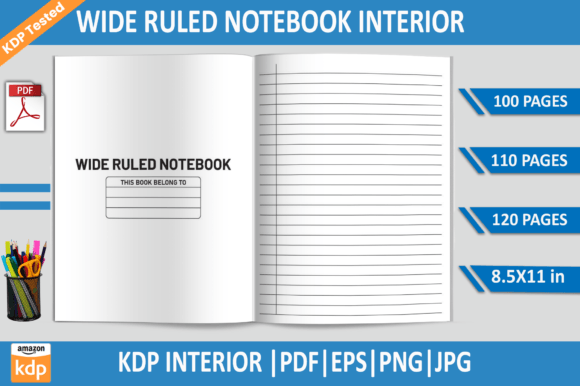
- Three ready-to-upload PDFs: 100-page, 110-page, and 120-page versions—all sized precisely to 8.5 × 11 inches, 300 DPI, with no bleed. Each is pre-formatted to meet KDP’s interior requirements, meaning no cropping surprises or unexpected margins.
- Editable EPS file: Built in Adobe Illustrator, this vector-based source lets you adjust line thickness, spacing, font, headers, footers—or even add custom dividers, section tabs, or inspirational quotes without pixelation.
- Transparent PNG + high-res JPG: Perfect for mockups, social media ads, or preview thumbnails. The PNG lets you drop the ruled page over any background; the JPG gives crisp, print-savvy previews for your Amazon listing.
No guesswork. No conversion errors. Just files that behave exactly as expected—because they’ve already been validated across multiple KDP test uploads.
KDP-Tested Isn’t Just Marketing—It’s a Real Time-Saver
“KDP-tested” sounds like standard boilerplate—until your first interior gets flagged for “low resolution” or “incorrect trim size.” This Wide Ruled Notebook KDP Interior was run through actual KDP pre-flight checks: uploaded, previewed, downloaded as a proof, and verified for color fidelity, sharpness, and gutter alignment. That means:
- No hidden compression artifacts—even at 300 DPI.
- Consistent 0.5-inch inner margins (gutter), accommodating KDP’s binding shift.
- Outer margins set to 0.75 inches—enough space for comfortable handling and no clipped content.
- No embedded fonts requiring licensing—everything is outlined or uses KDP-safe system fonts.
You’re not buying a template—you’re buying confidence. Confidence that your interior won’t trigger an error message, delay your launch, or look unprofessional next to competitors’ offerings.
How This Fits Into Real Publishing Workflows
Whether you’re a solopreneur launching your first journal series or a seasoned KDP publisher scaling a catalog of educational tools, this Wide Ruled Notebook KDP Interior slots in cleanly:
For New Publishers
Start with the 100-page PDF. Upload directly, pair it with a clean, minimalist cover (we’ll get to that in a sec), and publish in under 20 minutes. No Illustrator license? No problem—the PDF alone is fully functional. Later, use the EPS to experiment with adding date boxes, weekly planners, or subject-specific headers (e.g., “Biology Lab Notes” or “Spanish Vocabulary Tracker”).
For Series Builders
Already selling lined notebooks? Swap in this wide ruled version as a natural extension—label it clearly (“Wide Ruled Edition”) and cross-link in your backend keywords and bullet points. Customers searching for “wide ruled composition notebook” or “large line journal for kids” will find you faster—especially since KDP’s algorithm favors listings with precise, intent-matching interior descriptions.
For Educators & Coaches
Add value fast: open the EPS, insert your logo in the footer, embed a QR code linking to a free video tutorial or printable checklist, or insert a half-page reflection prompt every 10 pages. Because it’s vector-based, resizing elements maintains perfect clarity—even when scaled for a 6×9 version later.
Smart Customization Tips—Without Overcomplicating Things
You don’t need design expertise to get results—but a few intentional tweaks elevate perceived quality instantly:
- Keep line weight light but legible: This interior uses a subtle 0.4 pt stroke—visible enough for writing, invisible enough not to distract. Avoid going heavier unless targeting bold-pen users.
- Use consistent header/footer placement: The included EPS has smart guides. If you add a title like “Science Lab Journal,” place it 0.5 inches from the top edge—same distance on every page.
- Respect KDP’s color limits: Stick to black (C=0 M=0 Y=0 K=100) for lines and text. Avoid grays made from CMYK blends—they can shift unpredictably on press.
- Test your changes in PDF preview mode: Before re-uploading, export your edited EPS as a new PDF and open it in Adobe Acrobat. Zoom to 400%—check for fuzzy edges or stray anchor points.
Why File Variety Matters More Than You Think
The inclusion of EPS, PNG, and JPG isn’t about redundancy—it’s about flexibility across platforms and purposes:
- EPS = Your editable master. Change one setting, and all 120 pages update automatically (if using Illustrator’s global swatches or symbols).
- PNG = Your marketing asset. Drop it into Canva, paste it into Pinterest pins, or layer it over lifestyle photos for Instagram carousels.
- JPG = Your fast-check file. Open it in any viewer to confirm line spacing, page count, and overall tone—no software required.
And because all files are 8.5×11 inches and 300 DPI, you avoid the common pitfall of “resizing fatigue”—where one file works for covers but fails for interiors, or vice versa.
Final Thoughts: Less Setup, More Selling
Time is your most valuable KDP resource—not just in hours spent designing, but in missed opportunities while you debug formatting issues. This Wide Ruled Notebook KDP Interior eliminates friction at every turn: it’s pre-sized, pre-tested, multi-format, and purpose-built for the people who actually use wide-ruled paper. Whether you’re launching a back-to-school bundle, building a niche journal brand, or expanding your catalog with accessibility-first options, it’s a foundation that supports growth—not headaches.
When your interior just works, your energy shifts where it belongs: refining your cover, optimizing your description, testing ad angles, and listening to customer reviews. That’s how sustainable KDP publishing begins—not with complexity, but with clarity, consistency, and a Wide Ruled Notebook KDP Interior that delivers on its promise, page after page.