50 Editable Canva KDP Interior for Canva: A Practical Evaluation for Planners and Printables Creators
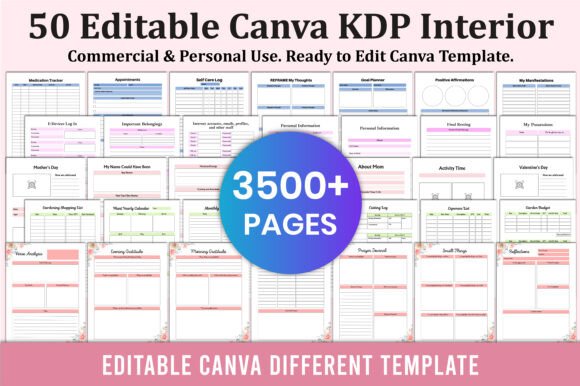
The 50 Editable Canva KDP Interior for Canva is a curated collection of interior page templates designed specifically for creators building printable planners, journals, and guided workbooks intended for Kindle Direct Publishing (KDP) or digital sale. These are not finished products but fully customizable Canva files—each page sized to standard KDP paperback dimensions (typically 6" x 9" or 8.5" x 11"), with consistent margins, bleed settings, and typography optimized for both on-screen editing and print-ready output.
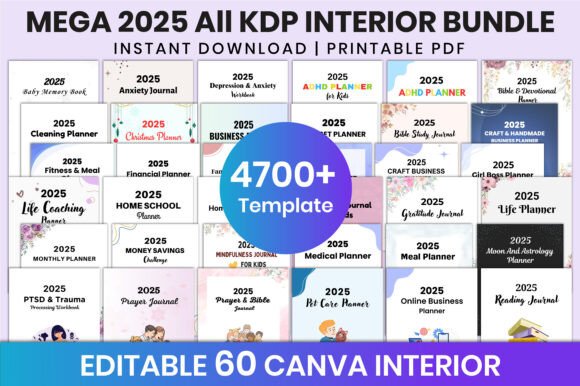
This bundle includes interiors for 50 distinct planner and journal concepts—from the 5 Minute Gratitude Journal and 12 Weeks Saving Challenge to specialized tools like the 40 Weeks Pregnancy Journal, ADHD Planner, and Ramadan Planner Canva. Each interior is structured with editable text boxes, placeholder graphics, and organized sections that follow common user expectations for functionality and flow. Importantly, this listing delivers only Canva template access—not PDFs, not source files for other design tools, and not physical goods.
Why Consider This Bundle?
Creators entering the planner printable space often face two recurring hurdles: time-intensive layout design and uncertainty around KDP formatting requirements. The 50 Editable Canva KDP Interior for Canva addresses both by offering pre-structured, compliant interiors that reduce setup time from hours to minutes. For someone evaluating options, the appeal lies in efficiency—not just speed, but consistency across multiple titles. Using one cohesive design system (fonts, spacing, icon style, grid alignment) helps build brand recognition across a product line, especially when launching several journals simultaneously.
It also lowers the technical barrier. Unlike designing from scratch in Adobe InDesign or wrestling with KDP’s margin and bleed rules manually, Canva’s interface allows users to adjust text, swap colors, insert personal branding elements, and export ready-to-upload PDFs—all without advanced desktop publishing knowledge.
Key Benefits and Realistic Tradeoffs
Benefits include:
- Time savings — Templates eliminate repetitive layout tasks for common journal structures (e.g., daily logs, weekly spreads, reflection prompts).
- KDP compatibility — Pages are built with correct trim size, safe zones, and bleed guides, reducing rejection risk during KDP review.
- Scalability — One Canva account can manage edits across all 50 interiors, making version updates or seasonal redesigns manageable.
- Flexibility within constraints — All text, colors, and many graphic elements remain editable, supporting light customization without needing design expertise.
Tradeoffs to acknowledge:
- No native support for interactive features — While Canva supports basic hyperlinks in digital PDFs, these interiors are optimized for static print use. Interactive checkboxes, form fields, or embedded audio aren’t part of the template architecture.
- Design consistency ≠ uniqueness — Because layouts follow familiar planner conventions (e.g., dated daily entries, prompt-based reflection sections), differentiation relies heavily on original content, voice, and branding—not structural novelty.
- Canva dependency — Editing requires an active Canva account (Pro features aren’t mandatory, but some advanced functions like bulk font replacement or brand kit syncing require it).
- Limited typographic or layout depth — Complex multi-column grids, custom paragraph styles, or precise CMYK color control aren’t feasible in Canva, which may matter for high-end print production.
When This Bundle Fits Well
The 50 Editable Canva KDP Interior for Canva is a strong fit for creators who prioritize launch velocity and operational simplicity over granular design control. It suits those building a portfolio of niche journals—such as Mental Health Self-Care Planner, Bible Study, or Pet Care Planner—and want to test demand across topics before investing in custom development. It also works well for educators, coaches, or faith-based practitioners developing companion materials for existing programs, where content authority matters more than visual distinction.
Additionally, if your workflow already centers on Canva—for client collaboration, rapid prototyping, or team-based editing—this bundle integrates smoothly without requiring new software adoption or training.
When Alternatives May Be Better
If your goal is a highly differentiated visual identity—say, hand-drawn illustrations, bespoke typography systems, or experimental layouts—then starting from scratch in a professional design tool (like Affinity Publisher or InDesign) offers greater fidelity and flexibility. Similarly, creators planning to sell editable digital downloads (not just static printables) may need layered PSD or AI files, which this Canva-based bundle does not provide.
For those focused exclusively on digital-only distribution (e.g., Notion templates or GoodNotes-compatible PDFs), KDP-specific interiors are irrelevant—and a different set of templates, built for screen interaction and annotation, would be more appropriate.
Making a Practical Decision
Before choosing the 50 Editable Canva KDP Interior for Canva, clarify your primary objective: Are you aiming to validate ideas quickly? Build a cohesive catalog under tight deadlines? Or refine a signature aesthetic across many titles? If speed and breadth are priorities—and your audience values functional clarity over visual novelty—this bundle delivers measurable utility.
Conversely, if your differentiator is deep customization, tactile paper quality, or integration with external tools (like automatic data sync or API-driven content), then investing time in learning a more robust publishing workflow—or partnering with a designer—may yield stronger long-term results.
Also consider your capacity for iteration. Canva makes small tweaks easy, but large-scale redesigns—such as converting a linear journal into a modular workbook—still require significant manual adjustment. Reviewing a few sample interiors (e.g., Gratitude Journal Canva, Manifestation Dream Life Journal, or Medical Planner) helps assess whether the underlying structure matches how your intended users think and engage with content.
In summary, the 50 Editable Canva KDP Interior for Canva is a practical resource—not a shortcut, but a focused tool. Its value emerges not in isolation, but in alignment with your content strategy, technical comfort, and business goals. Evaluating it alongside your actual workflow, audience expectations, and growth timeline leads to more grounded decisions than comparing features alone.