Why the Editable Goal Planner Canva KDP Interior Is a Game-Changer for Planners, Creators, and Entrepreneurs
If you’ve ever spent hours formatting a planner in Word or wrestling with layers in Photoshop—only to realize it’s not quite right—you’re not alone. The Editable Goal Planner Canva KDP Interior solves that exact frustration. It’s not just another digital download. It’s a fully customizable, print-ready, professionally designed interior built from the ground up for flexibility, clarity, and real-world use.
What Makes This Planner Truly Editable?
“Editable” is often overused—but here, it means something specific and powerful. Every page of this Editable Goal Planner Canva KDP Interior opens directly in Canva, where you can change anything: fonts, font sizes, colors, spacing, layout structure—even swap out icons or insert your own photos. No design skills required. No software installs. Just click, type, drag, and personalize.
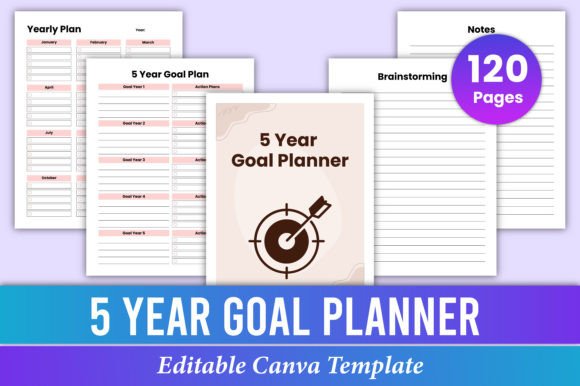
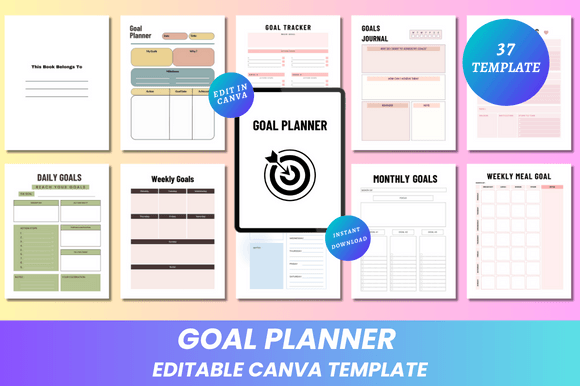
This isn’t a static PDF with limited text boxes. It’s a living document: 37 pages of intentional, functional spreads—all editable in seconds. Whether you want bold sans-serif headers for impact or soft pastel accents for calm focus, Canva gives you full control. And because it’s browser-based, you can tweak your planner on a laptop at your desk, a tablet on your couch, or even your phone while waiting for coffee.
Designed for Real Goals—Not Just Pretty Pages
A goal planner only works if it supports how people actually think, plan, and follow through. That’s why this Editable Goal Planner Canva KDP Interior includes purpose-built sections like:
- GOAL TRACKER — Visual progress bars and milestone checklists keep motivation visible
- GOALS JOURNAL — Space to reflect on wins, setbacks, and pivots—not just list tasks
- DAILY ROUTINE + DAILY GOALS — Sync habits with outcomes so intention drives action
- WEEKLY MEAL GOAL — Because nutrition goals need structure too, not just willpower
- FINANCIAL GOAL & SAVINGS GOAL — Track income, expenses, and targets side-by-side
- BUSINESS GOAL & COACHING GOALS — Built-in prompts for client milestones, service launches, and revenue targets
Notice how each section serves a distinct mental model? Daily planning is about execution. Weekly planning is about rhythm. Monthly and annual views are about alignment. The Editable Goal Planner Canva KDP Interior respects that hierarchy—so you’re never trying to force quarterly strategy into a daily log.
Why Size and Format Matter More Than You Think
It’s 8.5 x 11 inches—standard letter size. That may sound obvious, but it’s strategic. This size prints cleanly on home printers (no cropping), fits most binders and desk trays, and scales beautifully for professional print shops. You’ll receive high-resolution files in three formats:
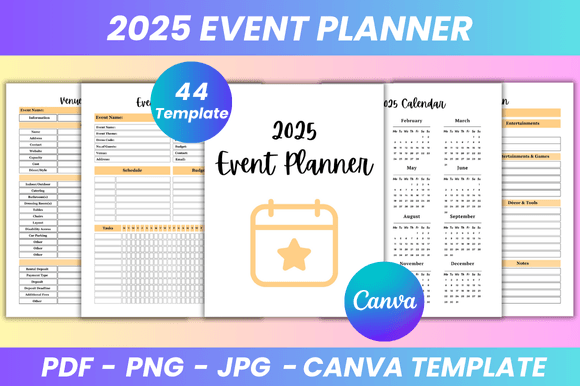
- Print-ready PDFs — CMYK-optimized, bleed-free, with crisp text and vector-friendly elements
- JPG files — Ideal for quick previews, social sharing, or embedding in course modules
- PNG files — Transparent backgrounds included where useful (e.g., cover graphics, icons)
No guesswork. No “will this look sharp when printed?” moments. Just open, customize, export, and go.
KDP Sellers: This Is Your Interior Workflow Upgrade
If you publish planners on Amazon KDP, time is your most valuable asset. Formatting interiors manually eats hours—and one typo in a header or misaligned grid can trigger KDP rejection. With the Editable Goal Planner Canva KDP Interior, you skip the tedious setup. Just open the Canva link, update your branding (logo, colors, fonts), adjust margins to meet KDP specs (they’re already close), and export a print-ready PDF in under 20 minutes.
Plus, since every element is editable, you can easily create variations: a minimalist version, a fitness-focused spin, or a finance-first edition—all from the same base file. That means faster product launches, lower design overhead, and more room to test what resonates with your audience.
Who Actually Uses This—Beyond the Obvious?
Yes, students use it. Yes, coaches and therapists integrate it into client onboarding. But here’s who else reaches for the Editable Goal Planner Canva KDP Interior regularly:
- Freelancers — Tracking project deadlines, income goals, and skill-building alongside client work
- Small business owners — Mapping quarter goals, cash flow targets, and team development plans in one place
- New parents — Using the “Daily Routine” and “Weekly Meal Goal” pages to reclaim structure amid chaos
- Retirees building second acts — Leveraging the “Annual Goal Planner” and “Goal Action Plan” to design meaningful next chapters
- Teachers and homeschoolers — Adapting the “My Goals” and “Notes” pages for student goal-setting conferences
The common thread? They all need clarity—not clutter. They want scaffolding, not rigidity. And they value tools that adapt as their priorities evolve.
Design Choices That Support Focus—Not Distraction
You’ll notice the Editable Goal Planner Canva KDP Interior leans into clean, minimal design—not as a trend, but as function. Ample white space reduces cognitive load. Consistent typography builds visual rhythm. Subtle lines and soft dividers guide the eye without shouting. There are no distracting watermarks, forced branding, or decorative flourishes that compete with your content.
That minimalism also makes customization easier. Want to add your brand’s signature color? One click. Prefer a serif font for journaling sections? Done. Need extra margin for binding? Adjust in seconds. The design doesn’t fight you—it follows your lead.
Getting Started Is Simpler Than You Expect
After purchase, you’ll receive an email with two key things: an editable Canva link and a compressed folder of ready-to-use files. No account creation needed to view the Canva file—though signing in lets you save changes and access Canva’s full library of stock photos, icons, and templates.
From there, your workflow looks like this:
- Open the Canva link and click “Make a Copy” (so your edits stay private)
- Update fonts, colors, and logo using Canva’s intuitive toolbar
- Swap placeholder text with your voice—casual, professional, playful, or poetic
- Export as PDF (for printing) or JPG/PNG (for digital use)
- Upload to KDP, share with clients, or print at home
No tutorials required. No learning curve beyond basic drag-and-drop. Just immediate utility—with room to grow as your needs do.
Final Thought: Tools Should Serve Your Goals—Not Become One
A planner shouldn’t be another thing to manage. It should quietly empower you—to start small, stay consistent, pivot wisely, and celebrate progress meaningfully. The Editable Goal Planner Canva KDP Interior does exactly that. It’s flexible enough for experimentation, structured enough for accountability, and polished enough to inspire confidence every time you open it.
Whether you’re launching your first KDP planner, guiding clients toward breakthroughs, or simply rebuilding your own sense of direction—the right interior makes all the difference. And this one? It’s built to last, adapt, and deliver.