Budget Planner Canva KDP Interior
A well-structured Budget Planner Canva KDP Interior isn’t just a design—it’s the operational backbone of your self-published planning product. It’s what sits between your creative vision and the finished, print-ready planner that customers download, customize, and use daily. Whether you’re launching your first budgeting workbook or expanding a catalog of productivity tools, this interior template bridges intention and execution with precision.
Each Budget Planner Canva KDP Interior is built for flexibility without sacrificing professionalism. You receive an editable Canva link—fully functional, no workarounds needed—where fonts, colors, spacing, icons, layout grids, and even photo placeholders respond instantly to your input. That means you’re not locked into someone else’s aesthetic or structure. You decide whether a minimalist monochrome scheme supports your brand—or whether warm tones and hand-drawn accents better reflect your audience’s values. This level of control matters most when consistency across your KDP catalog builds trust and recognition.
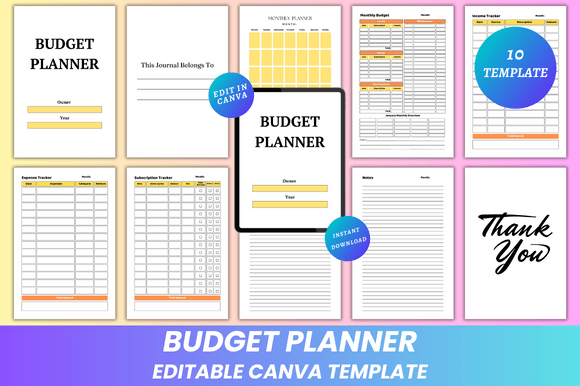
The interior includes ten thoughtfully sequenced pages: a “Belongs To” cover page, monthly planner spreads, income and expense trackers with clear column logic, a dedicated subscription tracker (critical for modern budgeters managing streaming, SaaS, and membership costs), dual note sections (“My Notes” and “Notes”), and a clean “Thank You” closing. None of these are decorative filler. Each serves a documented behavioral need—like reducing decision fatigue by pre-formatting recurring categories, or encouraging reflection through intentional whitespace in note areas.
Before launching a new planner, test how the Budget Planner Canva KDP Interior integrates into your existing workflow. If you use Airtable to manage product versions, drop the Canva link there alongside version notes and launch dates. If you collaborate with editors or proofreaders, share the Canva file directly—they can suggest changes in real time without switching platforms. For designers who also handle formatting, this eliminates the back-and-forth of PDF markups and re-imports. The editable nature means revisions happen where the final output lives—not in separate mockups or layered PSD files.
During production, leverage the included file formats strategically. The 6 × 9 inches PDFs are print-ready with no bleed—ideal for KDP’s upload requirements and home printing alike. Use the JPG and PNG exports for quick social previews, email banners, or listing thumbnails. Because all assets render crisply at standard resolution, you avoid pixelation when scaling for Pinterest pins or Instagram carousels. And since the interior is built to KDP’s trim and margin specs from the start, you sidestep last-minute cropping surprises or gutter misalignment during preview.
After publishing, the Budget Planner Canva KDP Interior continues working for you. When customers request minor customizations—like swapping a dollar symbol for euros or adding a bilingual label—you make those edits in seconds, re-export, and send a revised PDF. No developer dependency. No font licensing headaches. No need to relearn a new tool each time. That responsiveness strengthens customer relationships and reduces support overhead, especially for creators selling multiple planner variants.
Compatibility is built-in, not bolted on. Canva works across devices and operating systems, so whether you’re refining a layout on a tablet during a commute or adjusting typography on a desktop before a deadline, the experience stays consistent. It also syncs with cloud storage—if you save your Canva project to Google Drive or Dropbox, your team accesses the same source file. That eliminates version confusion when multiple people touch the same interior across development, marketing, and fulfillment stages.
Organization starts with clarity—and the Budget Planner Canva KDP Interior delivers it structurally. Page order follows cognitive flow: identification (Belongs To), overview (Monthly Planner), tracking (Income/Expense/Subscriptions), reflection (Notes), and closure (Thank You). There’s no arbitrary section stacking. Every element has purpose and placement logic. Even the “No Bleed” specification isn’t just technical—it ensures critical text and borders remain legible after KDP’s automated trimming, preserving usability in physical copies.
Efficiency gains compound over time. Once you’ve customized one Budget Planner Canva KDP Interior, duplicating it for a quarterly version or a student-focused variant takes minutes—not hours. Save color palettes as Canva brand kits. Store frequently used icons in your asset library. Build reusable text styles for headers, subheaders, and body copy. These small habits turn a single template into a scalable system. That’s how freelancers ship five planners in the time it used to take to finalize one.
Quality control becomes simpler, too. Because every element is editable and visible in-context, you catch inconsistencies early: mismatched font weights between the “Income Tracker” header and the “Expense Tracker” header, uneven padding around checkboxes, or subtle alignment drift in table columns. You don’t need external proofing tools—you see exactly what prints, exactly how it prints. That direct line from edit to output tightens feedback loops and raises baseline quality across your entire KDP store.
Long-term use depends on sustainability—and this interior supports it. Lifetime access means updates, seasonal redesigns, or accessibility improvements (like higher-contrast text options) don’t require repurchasing. New designs are added regularly, so if your audience requests a debt payoff tracker or a side-hustle income log, you’ll find updated templates aligned with current best practices—not outdated layouts built for 2018 workflows. That ongoing relevance keeps your catalog fresh without constant reinvention.
For educators building classroom budgeting units, this interior provides a ready-to-assign, customizable handout—no design training required. Freelancers use it to track client payments, retainer renewals, and software subscriptions in one place. Small business owners layer it over their accounting exports to spot trends visually, without learning complex dashboards. Bloggers embed screenshots in tutorials showing *exactly* how to adjust row height or swap icons—making their content more actionable and shareable.
Preparation is straightforward: open the Canva link, review the 10-page sequence, and identify where your voice fits—in tone, terminology, or visual emphasis. Do your readers prefer active verbs (“Track Monthly Spending”) over passive ones (“Spending Overview”)? Swap them. Does your brand use rounded corners or sharp edges? Adjust the shape settings. Are your ideal users balancing student loans *and* freelance income? Add a second income category row—Canva lets you duplicate and relabel in one click.
There’s no need to over-engineer the first version. Launch with the core structure intact, then iterate based on real usage data: which pages get the most annotations in customer reviews? Which trackers see the highest download rates for editable versions? Let those insights—not assumptions—guide your next update. That grounded, evidence-based approach is what separates sustainable KDP creators from those chasing short-term trends.
This isn’t about filling pages. It’s about enabling decisions—what to spend, where to cut, when to invest, how to reflect. The Budget Planner Canva KDP Interior gives structure to those moments, quietly supporting discipline without demanding perfection. When your tools align with how people actually think, plan, and act, the work feels less like maintenance and more like momentum.