Side Hustle Planner Canva KDP Interior: Your Fully Editable, Print-Ready Roadmap to Side Income Success
Launching a side hustle isn’t just about having a great idea—it’s about consistent planning, realistic tracking, and adaptable tools that grow with you. That’s where the Side Hustle Planner Canva KDP Interior stands out: not as a static PDF or rigid template, but as a living, breathing planning system designed for action—not aesthetics alone.
More Than Just Pages—It’s Your Strategic Framework
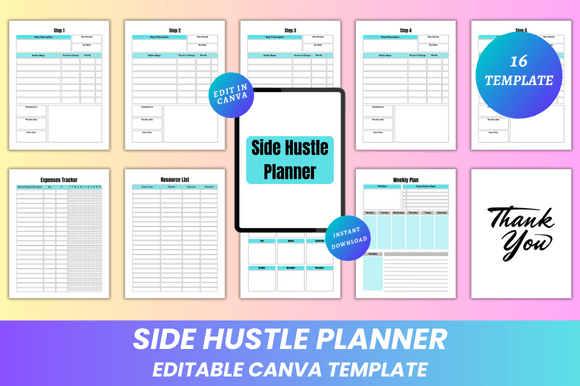
The Side Hustle Planner Canva KDP Interior is a 16-page, 8.5 × 11 inch digital planner built specifically for creators, freelancers, solopreneurs, and professionals launching or scaling income-generating projects outside their full-time roles. Unlike generic planners, it walks you through a proven, step-by-step progression—from ideation to execution—with dedicated space for reflection, resource management, and accountability.
Each section serves a functional purpose:
- Belongs To page — Personalizes ownership before you begin.
- Step 1–6 — Guides you from defining your “why” and validating your idea (Step 1) to pricing strategy, launch prep, and post-launch review (Steps 2–6).
- Expenses Tracker — Helps you monitor startup costs, recurring fees, and ROI—critical when bootstrapping.
- Resource List — Captures tools, contacts, platforms, and references in one searchable place.
- Monthly Goals + Weekly Plan — Bridges long-term vision with short-term action—no more vague intentions.
- My Notes & Notes — Flexible space for brainstorming, meeting takeaways, or quick reflections.
- Thank You page — A subtle but meaningful reminder of gratitude—especially useful during demanding launch phases.
Why Editability on Canva Changes Everything
Here’s what makes the Editable Side Hustle Planner Canva KDP Interior uniquely practical: every element lives inside Canva—and every element is editable. Fonts, colors, spacing, icons, photo placeholders—even layout structure—can be adjusted in seconds. No design software required. No coding. No frustration.
This means you’re not stuck with someone else’s aesthetic or workflow logic. Prefer bold headers? Change them. Need larger checkboxes for your weekly plan? Resize them. Want to embed screenshots of your Shopify dashboard or client feedback? Drag and drop. Even if you’ve never opened Canva before, the intuitive interface lets you personalize deeply—without compromising print readiness.
And because it’s built for KDP (Kindle Direct Publishing), the interior aligns precisely with Amazon’s formatting standards: no bleed, CMYK-safe color profiles, crisp 300 DPI resolution, and clean margins—so your printed version looks polished whether you’re self-publishing or printing at home.
Real-World Use Cases: Who Benefits—and How?
Freelance Writers & Designers: Use Step 4 (Pricing & Packages) to draft service tiers, then populate the Expenses Tracker with subscription costs (e.g., Canva Pro, Grammarly, Adobe). Upload portfolio images into photo placeholders for visual pitch decks.
Etsy Sellers & Digital Product Creators: Map product development timelines across Monthly Goals and Weekly Plans. Track material costs, listing fees, and ad spend in the Expenses Tracker—and reference vendor links directly in the Resource List.
Teachers & Coaches Launching Online Courses: Flesh out learning modules using Step 2 (Target Audience & Offer), then use My Notes to capture student feedback after each beta session. Add branded banners or course thumbnails via Canva’s drag-and-drop editor.
Corporate Professionals Building Passive Income: Keep personal goals separate from work demands by customizing colors and fonts to signal “this is *my* time.” Use the Belongs To page to reaffirm commitment—especially helpful during early-morning or late-night planning sessions.
What You Actually Receive (No Surprises)
When you download the Side Hustle Planner Canva KDP Interior, you get immediate, lifetime access to:
- An editable Canva link—ready to open, customize, and save in your own Canva account.
- A high-quality, print-ready PDF (8.5 × 11”, no bleed, CMYK-optimized).
- JPG and PNG files—ideal for digital use, social media previews, or embedding in Notion or Obsidian.
- A clean, minimal design—focused on function, not distraction. Ample white space, clear typography hierarchy, and logical visual flow.
- 16 fully structured pages—no filler, no fluff. Every page has intent.
There are no subscriptions. No hidden upsells. No watermarks. And because new designs are added regularly, returning customers gain access to updated layouts, seasonal themes, or expanded sections—like budget forecasting templates or client onboarding checklists—without repurchasing.
Strengths—and Honest Considerations
Strengths:
- Flexibility without complexity — Editable on Canva means zero learning curve, yet deep customization potential.
- KDP-ready by design — Saves hours of troubleshooting margins, fonts, or bleed settings.
- Action-oriented structure — Moves beyond daily to-do lists into strategic milestone mapping.
- Ownership-first mindset — The “Belongs To” page and Thank You page quietly reinforce intentionality and sustainability.
Considerations:
- This is an interior file only—not a full KDP book package (cover, copyright page, or ISBN setup aren’t included).
- While fully editable in Canva, advanced features like auto-numbering or conditional formatting require manual updates.
- For teams or collaborative planning, consider exporting individualized versions—Canva links are tied to your account unless shared explicitly.
Making It Work for *Your* Workflow
Start simple: Open the Canva link, duplicate the template, and rename it “Q3 Side Hustle Launch.” Then pick one section to complete first—maybe Step 1 (Idea Validation) or the Monthly Goals page. Don’t aim for perfection. Aim for momentum.
Print your first two pages and keep them on your desk. Use the Weekly Plan every Sunday evening—not as a rigid schedule, but as a compass. Revisit the Expenses Tracker biweekly. Update the Resource List whenever you discover a new tool or contact.
And remember: the Editable Side Hustle Planner Canva KDP Interior isn’t meant to replace your intuition—it’s meant to hold space for it. When doubt creeps in, flip to the Belongs To page. When burnout looms, pause at the Thank You page. When progress feels invisible, trace back through Steps 1–6 and see how far you’ve come.
Because building something meaningful takes time, iteration, and the right scaffolding. This planner doesn’t promise overnight success—but it does give you a thoughtful, adaptable, beautifully simple way to show up—for your idea, your goals, and yourself.
Thanks for visiting ❤️❤️. Whether you're sketching your first business model canvas or refining your third revenue stream, this interior was made to support you—clearly, calmly, and completely.