Canva Notebook Papers KDP Interior
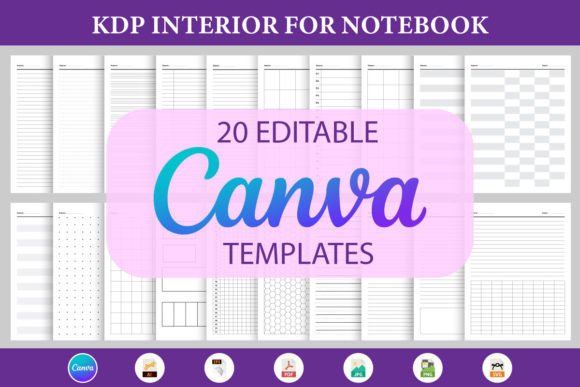
If you're designing notebooks for Kindle Direct Publishing—or building print-on-demand journals, planners, or workbooks—you need interiors that look polished, print cleanly, and convert browsers into buyers. Canva Notebook Papers KDP Interior delivers exactly that: a professionally structured, fully editable collection of 20 notebook paper designs built from the ground up for KDP’s technical requirements and real-world usability.
This isn’t just another generic template pack. It’s a production-ready toolkit—engineered for creators who value precision over pretense. Whether you’re launching your first journal series or scaling a brand of educational workbooks, these interiors eliminate guesswork around bleed, margins, font embedding, and CMYK-safe color handling—all while staying fully editable inside Canva.
What You Actually Get (And Why It Matters)
You’ll receive each of the 20 notebook papers in seven complementary formats, all organized for immediate use:
- A direct Canva Editable Link—no download needed; open and customize in seconds
- A clean Text File with line spacing, margin notes, and KDP page count guidance
- A print-optimized PDF File (300 DPI, CMYK-ready, with crop marks where appropriate)
- A vector-based AI File and EPS File for deep customization in Adobe Illustrator
- 20 SVG Files—ideal for layering, web previews, or cutting machines if you extend into physical merch
- 20 Transparent PNGs—perfect for mockups, social media promos, or digital previews
- 20 JPGs—fast-loading, high-res previews for Amazon thumbnails or client reviews
The “All in One” AI/EPS/PDF and ZIP bundles mean you’re never hunting for the right file type mid-project. No re-exporting. No version confusion. Just open, adapt, and upload.
Designed for Real Workflows—Not Just Pretty Previews
These interiors follow KDP’s latest interior guidelines to the letter: 0.25" inner margins (to avoid gutter loss), consistent 0.5" top/bottom margins, and line heights calibrated for readability on both print and screen. Every page includes subtle but functional design cues—like faint horizontal rules aligned to standard handwriting height, or dot-grid variants spaced at 5mm for bullet journaling without visual clutter.
Typography is intentional—not decorative. Fonts are either system-safe (like Calibri or Georgia) or embedded in vector files so they render identically across devices and printers. There’s no reliance on obscure fonts that break when exported or misalign in KDP’s previewer.
Color usage is restrained and purposeful. Background tints—if present—are kept below 12% opacity to ensure ink doesn’t bleed on standard 60–70 lb. paper. No gradients, no transparency effects that collapse during PDF flattening. What you see in Canva is what prints.
Where These Interiors Make a Tangible Difference
For educators and course creators: Use the lined or Cornell-note variants as printable worksheets or student reflection pages. The clean layout keeps focus on content—not decoration. Add your logo in the header space, embed learning objectives in the footer, and export directly to PDF for LMS uploads or printed handouts.
For coaches and consultants: Turn blank journal pages into branded tools. Insert prompts (“What’s one action I’ll take before Friday?”), habit trackers, or weekly review templates—then lock non-editable elements (like headers or footers) in Canva to prevent accidental changes during bulk edits.
For indie authors and fiction writers: Pair these interiors with custom covers to build companion journals for book launches. Readers love spaces to jot down character notes, plot ideas, or personal reflections—especially when the paper feels intentional, not afterthought.
For freelancers and agencies: Maintain consistency across client deliverables. If you design workbooks for corporate training, swap out placeholder text in seconds, insert client-branded headers, and output print-ready PDFs without touching Illustrator or InDesign. That’s billable time saved—and fewer revision rounds.
Smart Customization Tips (That Save Hours)
Start with the Canva link—but don’t stop there. For best results:
- Test early in KDP’s previewer. Upload your first PDF draft *before* finalizing fonts or colors. KDP sometimes renders thin lines or light grays differently than desktop viewers.
- Use the SVGs for mockups, not printing. They scale infinitely for Instagram carousels or Etsy banners—but always export final interiors as PDFs from Canva or Illustrator.
- Batch-edit efficiently. Duplicate your Canva design, then use “Find and Replace” for recurring text (e.g., changing “Day 1” to “Session 1” across 20 pages).
- Leverage the AI/EPS files if you’re adding complex graphics. Need an icon set, custom dividers, or watermark patterns? Vector files let you scale, recolor, and layer without pixelation.
And remember: KDP counts blank pages—including title pages and copyright pages—toward your total page count. The Text File included helps you calculate exact pricing tiers and trim size options before uploading.
Practical Considerations Before You Scale
These interiors shine brightest when matched thoughtfully to your audience’s needs—not just your aesthetic preferences. A minimalist dot-grid works for creatives tracking ideas, but may frustrate students needing clear line guidance for essays. A bold college-ruled variant reads well on low-resolution e-ink devices, while ultra-light graph paper suits architects or UX designers sketching wireframes.
Also consider your production pipeline. If you rely heavily on automation (like auto-generating 100+ journal variants via scripts), lean into the PDF and AI files—they integrate cleanly with tools like Python’s reportlab or Illustrator scripting. If your process is Canva-first and human-paced, the editable link and PNGs will carry you further, faster.
Finally, don’t overlook licensing clarity. These files are for your commercial use—meaning you can sell notebooks built from them on Amazon, Etsy, or your own site. But you can’t resell the source files themselves or claim copyright over the base layouts. That boundary keeps your business compliant and scalable.
At its core, Canva Notebook Papers KDP Interior removes friction—not creativity. It gives you structure so you can focus on voice, value, and vision. Whether you’re drafting your first gratitude journal or your fiftieth productivity planner, it’s the quiet foundation that lets your ideas land with clarity, consistency, and confidence.