Bill Tracker Bundle Canva KDP Interior
Staying on top of recurring payments—bills, subscriptions, utilities, insurance, memberships—isn’t just about avoiding late fees. It’s about creating breathing room in your cash flow, reducing decision fatigue, and building consistent financial habits. The Bill Tracker Bundle Canva KDP Interior is designed for exactly that: a practical, customizable, print-ready system that integrates seamlessly into how real people manage money—not as an abstract concept, but as part of daily workflow.
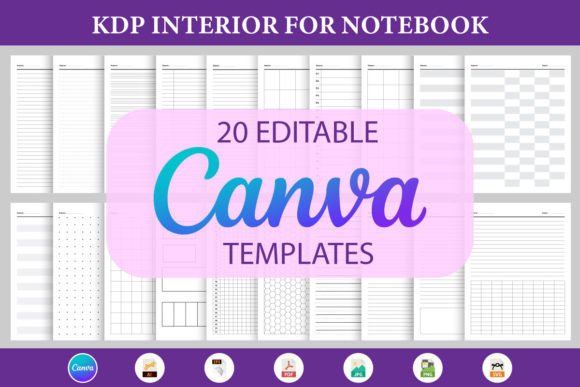
This isn’t a static PDF you fill out once and forget. Every page is fully editable in Canva—fonts, colors, layout spacing, icons, photo placeholders, even grid structures. That means it adapts to your visual language, your brand (if you’re publishing or reselling), or your personal preference—no design skills required. You’re not locked into someone else’s aesthetic or structure. You own the edit.
How It Fits Into Your Financial Workflow
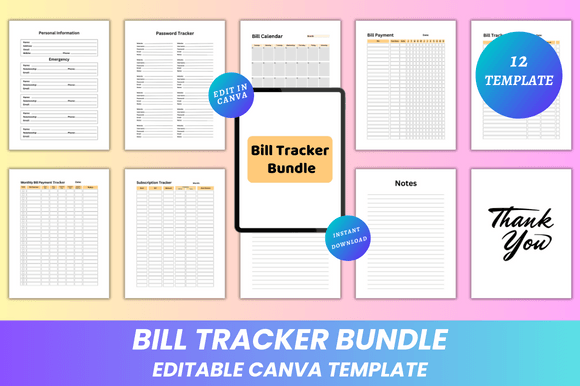
Think of the Bill Tracker Bundle Canva KDP Interior as a bridge between intention and execution. Before a billing cycle begins, you use the Bill Calendar to map due dates across months. During the month, you toggle between the Monthly Bill Payment Tracker and Subscription Tracker to log payments, note changes in amounts, flag upcoming renewals, or pause services. After the month closes, the My Notes and Notes pages help you reflect: Did a subscription deliver value? Was there an unexpected charge? What can be renegotiated next cycle?
It works especially well when paired with digital tools you already use. For example, set calendar reminders in Google or Outlook for due dates you’ve logged in the tracker—then use the physical or printed version as your central reference during weekly planning sessions. Or if you’re using a spreadsheet for high-level budgeting, treat this bundle as your tactical companion: where the spreadsheet shows totals, this shows timing, ownership, and action status.
Real-World Use Cases Across Roles
Freelancers and solopreneurs often juggle client invoices alongside their own recurring expenses. With the Personal Information and Password Tracker pages included, they can keep login details for accounting software, hosting platforms, or subscription-based tools secure and accessible—right next to bill due dates. No more flipping between sticky notes and browser tabs.
Educators and content creators building Canva-based planners or productivity kits for sale on KDP benefit from the clean, minimal 8.5 x 11” layout—optimized for Amazon’s interior requirements. Because each template is editable via Canva link, they can rapidly iterate designs, test color schemes with audiences, or localize versions (e.g., adding VAT fields for EU buyers) without rebuilding from scratch.
Small business owners managing multiple vendors—web hosting, SaaS tools, insurance premiums—use the Bill Payment and Subscription Tracker pages to audit spending quarterly. They export the final PDFs for internal review or share JPG/PNG previews with bookkeepers. The absence of bleed and CMYK-ready output ensures professional printing at local shops—no last-minute formatting surprises.
Preparation and Compatibility: What You Need to Know
No special software is required beyond a free Canva account. All templates open directly in Canva’s editor—no plugins, no downloads, no compatibility headaches. Fonts are web-safe and embedded; colors adjust globally with Canva’s theme palette; image placeholders accept PNG, JPG, or SVG uploads. If you prefer handwriting, the PDF files are optimized for crisp ink rendering on home printers—or laser/inkjet print shops.
The 12-page structure balances completeness with focus: enough pages to capture essentials without overwhelming. There’s no filler. Each section serves a distinct function—Belongs To for quick identification, Password Tracker for secure credential logging, Thank You for closing notes or gratitude journaling—and all align to standard U.S. letter size (8.5 x 11 inches), making binding, scanning, or filing intuitive.
Implementation Tips for Consistent Use
- Start small: Don’t try to populate every tracker on day one. Pick three recurring bills (e.g., rent, phone, streaming service) and build momentum from there.
- Batch-edit before printing: Use Canva’s “Find and Replace” feature to update fonts or colors across all 12 pages at once—especially helpful if you’re prepping multiple versions for clients or teams.
- Anchor it to an existing habit: Keep the printed tracker next to your coffee maker, beside your laptop, or inside your planner. Pairing it with something you do daily increases consistency more than any reminder app.
- Revisit the “Notes” pages monthly: These aren’t afterthoughts—they’re your audit trail. Jot down why you canceled a service, what you negotiated, or which bill increased unexpectedly. Over time, patterns emerge.
Long-Term Value and Flexibility
Lifetime access means updates—new layouts, seasonal themes, additional trackers—are added without extra cost. That matters because financial needs evolve: maybe you add a side hustle and need to track vendor payments; perhaps you move abroad and must track currency conversions. The editable nature lets you adapt faster than downloading a new product each time.
And because files come in multiple formats—print-ready PDF, high-res JPG, transparent-background PNG—you’re never boxed in. Upload PDFs directly to KDP. Drop PNGs into social media posts explaining budgeting methods. Embed JPGs in email newsletters for subscribers who want printable resources. The flexibility supports distribution, teaching, personal use, and resale alike.
Design Integrity Meets Practical Output
The clean, minimal design isn’t just visually calming—it reduces cognitive load. Ample white space, consistent typography hierarchy, and intuitive iconography mean less time decoding layout and more time acting on information. There are no decorative elements that interfere with writing or scanning. Grid lines are subtle but present. Date fields align vertically for fast comparison. Even the “Thank You” page serves purpose: a quiet moment to acknowledge progress before moving to the next cycle.
Quality control happens upstream—in Canva. Adjust margins, preview mobile responsiveness, test print on plain paper first. Since there’s no bleed, you avoid cropped edges at commercial printers. And because everything exports at 300 DPI, your final product looks sharp whether it’s stapled into a notebook or bound as a premium planner.
Final Thought: Integration Over Installation
The Bill Tracker Bundle Canva KDP Interior doesn’t ask you to overhaul your life. It asks you to slot it in—wherever your current process has friction. Maybe that’s replacing a cluttered spreadsheet. Maybe it’s upgrading a handwritten list that keeps getting lost. Or maybe it’s giving your KDP customers a tool that feels both professional and deeply personal.
What makes it stick isn’t novelty—it’s usability. You don’t need permission to change it. You don’t need training to maintain it. You just need 10 minutes, a Canva tab, and the willingness to treat your finances like a living system—not a static report. New designs are added regularly, so if today’s layout doesn’t match your rhythm, check back in a few weeks. Your workflow isn’t fixed. Neither is this tool.